
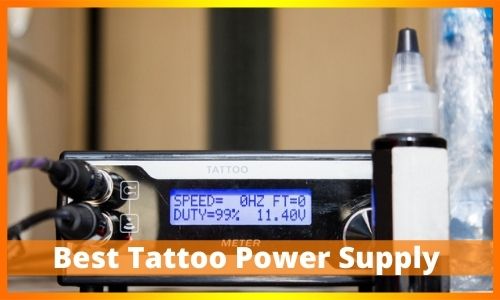
The tattoo power supply is a crucial component of your setup. It sends power from the wall outlet to your tattoo machine. Think of it like the gas pedal in a car. It lets you speed up or slow down your needle.
This gives you total control over your art. It also keeps your client safe. Today, we will discuss the parts, types, and settings of a tattoo power supply.
Key Components
To use the device effectively, you must be familiar with its components. Here is what you need to look for.
- Main Power Switch: This turns the unit on and off. Use this switch when you take a break. You do not need to unplug the cords.
- Voltage Knob: This changes the power level. Turn it up for more speed. Turn it down for less speed. Some units use buttons instead of a knob.
- Display Screen: This shows your voltage number. It helps you get the exact setting you need. You can use a digital screen or an analog dial.
- Input Jacks: These are the holes for your cords. One hole is for the tattoo machine. The other is for the foot pedal. Some units have two machine slots. This lets you switch between machines fast.
Important Terms to Know
There are two terms you will hear often. It is good to know what they mean.
Duty Cycle: This is mostly for coil machines. It shows the rhythm of the machine. It tracks how long the machine is “on” during one tap. For a smooth shader, you want this number near 50%. If you use a rotary machine, you do not need to worry about this.
Optimum Voltage Rate: This is the “sweet spot” for your machine. Most machines run well between 4 volts and 10 volts. If the voltage is too low, the needle will snag. If it is too high, it will hurt the skin. Start at 6 volts and adjust from there.
Types Of Tattoo Power Supply
There are three main types of power supplies. Each one has a different job.
- Analog Units: These are “old school.” They use a dial and a needle to show power. They are tough and last a long time. But they are hard to read quickly.
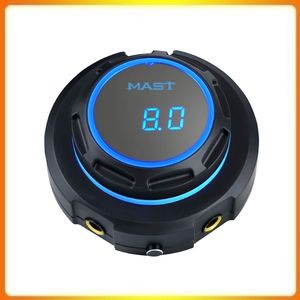
- Digital Units: These are the most common. They have a bright LED screen. They show you the exact voltage number. This makes it easy to set your machine perfectly every time.
- Wireless Battery Packs: These are very popular now. You do not need a cord or a foot pedal. The battery plugs right into your tattoo machine. This lets you move freely.
Simple Voltage Cheat Sheet
New artists often ask, “What voltage should I use?” Every machine is different. But you can use this simple guide to start.
- Rotary Machines: 5 to 9 Volts.
- Coil Liners (for outlines): 7.5 to 8.5 Volts.
- Coil Shaders (for filling): 6 to 7.5 Volts.
> Tip: Always start with low voltage. Turn it up slowly until the ink goes in smoothly.
How to Set Up Your Power Supply
Are you ready to work? Follow these easy steps to set up your station.
- Safety First: Before you plug anything in, cover your power supply. Use a clear plastic barrier bag. This keeps germs off your knobs. This is vital for safety.
- Connect Power: Plug the main cord into the wall outlet.
- Plug in Tools: Put your tattoo machine cord into the machine slot. Put your foot pedal cord into the pedal slot.
- Zero Out: Turn the voltage knob all the way down.
- Test It: Step on the foot pedal. Slowly turn up the voltage knob. Listen to the sound. It should be a steady buzz or hum.
- Start Working: Once the sound is crisp and steady, you are ready to tattoo.
FAQs:
1. Should I use a higher voltage for lining or shading?
You should use a higher voltage for lining.
Lining: Higher voltage makes the needle move faster. This gives you a quick, clean hit. It helps create crisp, sharp lines that do not blur. (Try starting at 7.5 to 9 Volts).
Shading: Lower voltage makes the needle move more slowly. This gives a softer hit. It allows you to build up color slowly for smooth shading. (Try starting at 6 to 8 Volts).
2. Can using the wrong voltage damage my skin or the machine?
Yes, it can cause problems.
For the Skin, Voltage that is too high can cause too much trauma. This can lead to slow healing, pain, and “blowouts” (where the ink spreads under the skin).
For the Machine: Running a coil machine at a very high voltage for too long can cause the coils to overheat. This can wear out your internal parts faster.
3. Why do some power supplies have dual ports?
Dual ports (or “dual switch connections”) let you plug in two tattoo machines at the same time.
This is a huge time saver. You can set up one machine for Lining and the other for Shading.
You use the power supply’s switch to jump between the two machines instantly. This means you do not have to stop and change cords during a tattoo.
4. What is the difference between Amps and Volts?
Think of electricity like water flowing through a pipe:
Volts (Voltage): This is the pressure of the water. It controls how fast the needle hits the skin. This is what you adjust the most.
Amps (Amperage): This is the volume or amount of water flowing. If you use big needles (like a large magnum), you need a power supply with high Amps (2 Amps or more) to give the machine enough “muscle” to push the needles.
Troubleshooting:
This is one of the most common issues! The problem is usually not the power supply itself. It is often a faulty connection.
| Problem | Likely Fix (Check in Order) |
| Machine cuts in and out when you move it. | The Cord: Your clip cord or RCA cord is likely damaged or has a loose wire. Try a different cord. |
| Machine stops and needs a “flick” to start (coil only). | The Contact Screw: The screw is worn down or needs a small adjustment. Adjust the gap slightly. |
| Machine runs hot and loses power. | Voltage Too High: You are asking the machine to run too fast. Turn the voltage down and check your needle depth. |
| Power supply screen is blank. | The Charger/Outlet: Unplug the main charging cord from the power supply and plug it back in. Make sure the wall outlet is working. |
Conclusion
Setting up a tattoo power supply can seem hard at first. But it is easy once you know the parts. Remember to start with a lower voltage and work your way up. This keeps your work clean and safe. If you have questions, ask a pro artist for help. Thanks for reading.
Leave a Reply